Panel Layout and Ergonomic Design Principles
Optimizing panel layouts for operation and maintenance.
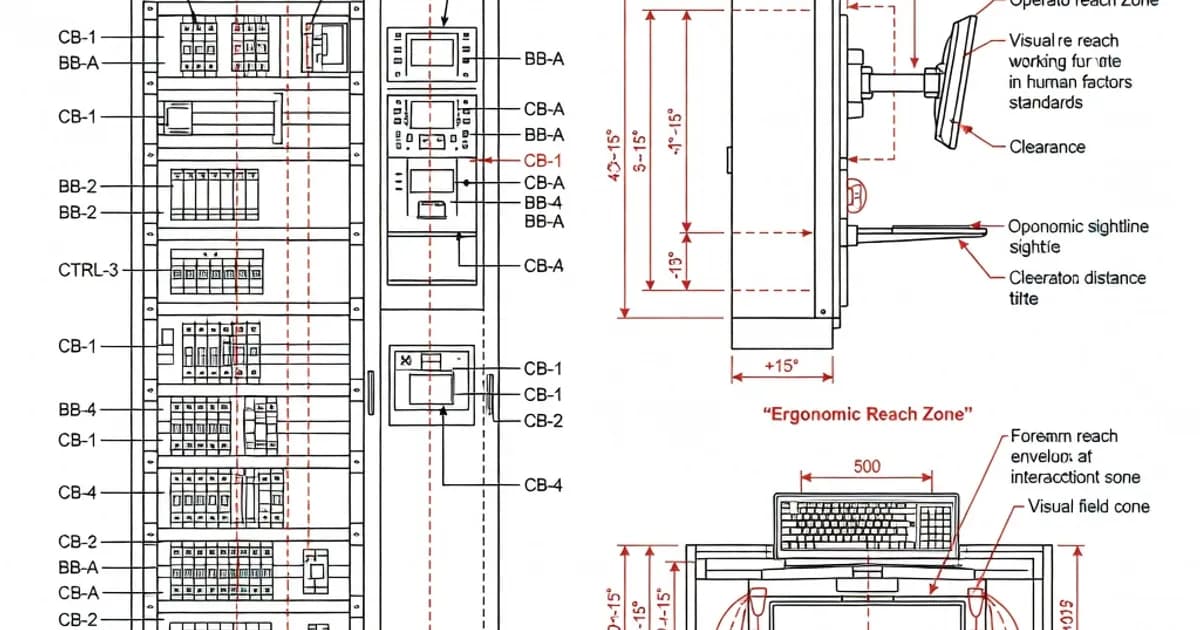
Panel Layout and Ergonomic Design Principles
Panel layout is not only an engineering exercise; it is a safety, maintainability, and operational efficiency problem. In IEC 61439 compliant low-voltage assemblies, the arrangement of devices, busbars, cable routes, barriers, and operating interfaces must support personal protection, property protection, functional reliability, and practical day-to-day use. Per IEC 61439-1 and IEC 61439-2, the assembly manufacturer must demonstrate that the design meets the standard’s verification requirements, while the specifier must define the operating conditions, ratings, and service expectations that influence the layout from the outset.
Good ergonomic design reduces wiring errors, shortens maintenance time, improves fault isolation, and lowers the risk of accidental contact with live parts. As documented in manufacturer guidance such as the ABB and Hager IEC 61439 application documents, layout decisions directly affect accessibility, thermal performance, segregation, and the ability to verify the assembly by design rules, calculation, or testing. In practice, a well-designed panel makes safe operation intuitive and maintenance less disruptive.
Why Layout Matters in IEC 61439 Assemblies
IEC 61439 establishes the framework for low-voltage switchgear and controlgear assemblies such as main switchboards, main distribution boards, and sub-distribution boards. The standard does not prescribe a single “best” layout, but it does require that the final arrangement supports the declared performance of the assembly. That includes rated current, short-circuit withstand capability, dielectric properties, temperature rise limits, clearances, creepage distances, and accessibility for operation and servicing.
The physical organization of the panel is therefore part of compliance. Poor layout can create excessive conductor length, unsafe access to energized parts, inadequate heat dissipation, difficult maintenance paths, and confusion during operation. A thoughtful layout supports the principle that safety and usability are interdependent: when devices are clearly grouped, labeled, and separated, the operator is less likely to make errors under pressure.
Core Design Objectives for Ergonomic Panel Layout
An ergonomic panel layout should satisfy several objectives at once:
- Safe operation: Operating handles, indicators, and test points must be positioned so they can be used without unnecessary exposure to live components.
- Clear functional grouping: Devices should be organized by source, feeder, function, or process area so that operators can understand the system quickly.
- Maintainability: Replacing components, tightening terminals, checking indicators, and testing protective devices should be feasible without dismantling the entire assembly.
- Thermal discipline: Heat-producing devices must be arranged to support ventilation and avoid hot spots that accelerate aging.
- Space efficiency: The panel should use enclosure volume effectively while preserving access, segregation, and future expansion margin.
- Verification readiness: The layout must support the assembly’s verified design, including clearances, barriers, busbar support, and conductor routing.
As highlighted in IEC 61439 guidance from several manufacturers, collaboration between the specifier, planner, and assembly manufacturer is essential. Decisions about ratings, incomer arrangement, outgoing feeder count, cable entry, and operational environment all influence the final ergonomics and cost.
Functional Zoning: A Practical Layout Strategy
One of the most effective ways to improve panel ergonomics is to divide the enclosure into clear functional zones. This simplifies operation and maintenance while reducing routing complexity. A typical low-voltage assembly often includes:
- Incoming zone: Main incomer device, metering, surge protection, and main isolation components.
- Busbar zone: Main horizontal or vertical busbars with verified support arrangements and protective barriers.
- Outgoing feeder zone: MCCBs, MCBs, contactors, motor starters, or other protective devices.
- Cable termination zone: Space for gland plates, bending radius, cable clamps, and terminal access.
- Auxiliary and control zone: PLCs, relays, power supplies, pushbuttons, indication lamps, and communications equipment.
This zoning helps prevent cross-interference between power circuits, control circuits, and maintenance access paths. It also supports segregation requirements when functional units must be separated to limit the spread of faults or to enable maintenance on one section while others remain energized.
Busbar Arrangement and Its Impact on Layout
Busbar geometry is a central layout decision in IEC 61439 assemblies. The research findings identify several common configurations:
- Vertical busbar mounting in cable compartments for distribution configurations.
- Vertical placement at the bottom of cells for distribution purposes.
- Horizontal placement from cell to cell for main distribution or interconnection.
- Inclined busbars limited to a maximum of 630 A.
These arrangements are not merely mechanical choices. They affect conductor length, thermal behavior, fault containment, accessibility, and serviceability. For example, a vertical busbar route may simplify feeder drops and reduce crossovers, while a horizontal backbone can support modular extension from cubicle to cubicle. Inclined busbars can help with compactness in smaller assemblies, but current limits and verification constraints must be respected.
Per IEC 61439-1, the layout must also account for the length of non-protected live conductors. A critical rule identified in the research is that the total length of non-protected live conductors between the main busbar and each associated SCPD must not exceed 3 meters. This restriction has direct implications for the placement of protective devices, especially in larger panels where the operator might otherwise favor long interconnections for convenience.
Comparison of Common Panel Layout Approaches
| Layout Approach | Typical Use | Ergonomic Advantages | Key Constraints |
|---|---|---|---|
| Horizontal busbar backbone | Main distribution and inter-cubicle connection | Clear feeder grouping, easy expansion, straightforward sectionalization | Requires careful barrier design and support verification |
| Vertical busbar in cable compartment | Distribution boards and feeder-heavy assemblies | Shorter feeder drops, easier cable routing, compact architecture | Must preserve access and conductor segregation |
| Bottom-mounted vertical busbar | Cell-based distribution | Convenient outgoing feeder arrangement and cable entry coordination | Thermal and mechanical support must be verified carefully |
| Inclined busbar layout | Compact assemblies up to 630 A | Space-saving arrangement, can simplify internal geometry | Current limitation, more demanding verification of clearances |
Accessibility, Reach, and Operator Interaction
Although IEC 61439 focuses primarily on electrical and structural safety, ergonomic design must also consider how humans interact with the panel. Controls should be placed where they can be seen, understood, and operated without awkward postures or unnecessary exposure. The most frequently used operating elements should be grouped logically and positioned at a consistent height across the installation where possible.
For maintenance personnel, good ergonomics means that terminals, test points, and replaceable devices can be reached without removing unrelated covers or disturbing live sections. Viewing windows, indicator lamps, and labeling should be positioned to support quick diagnosis. Door-mounted equipment should align with the operator’s line of sight and avoid forcing the user to crouch, stretch, or lean into the enclosure.
Practical ergonomics also includes the human factors of inspection. Clear wiring ducts, readable labels, and color-coded functional grouping reduce cognitive load during commissioning and troubleshooting. In a complex assembly, clarity is a safety feature.
Segregation, Barriers, and Touch Protection
Segregation strategy strongly influences layout quality. By separating busbars, functional units, and cable termination areas, the assembly can better control fault propagation and reduce the risk of accidental contact. This is especially important in panels where maintenance may occur while parts of the assembly remain energized.
Touch protection is a foundational IEC 61439 concern. Barriers, shutters, insulated covers, and enclosure design must prevent direct contact with live parts under normal conditions. At the same time, these protective measures should not make routine maintenance unnecessarily difficult. A well-ergonomically designed panel uses barriers that can be removed or opened in a controlled manner, with fasteners and access points positioned for safe servicing.
In higher-risk applications, internal arc considerations are also relevant. The research notes IEC 61641 as the reference for internal arc withstand testing. Where internal arc performance is required, layout must support pressure relief paths, compartment strength, and safe venting directions. This affects door design, partitioning, and component placement, not only electrical performance.
Cable Routing and Termination Discipline
Cable routing is one of the most visible indicators of panel quality. A clean routing layout improves airflow, simplifies troubleshooting, and reduces the chance of insulation damage or inadvertent stress on terminals. Separate pathways for power, control, and communication cables are good practice because they reduce electromagnetic interference and improve maintainability.
From an ergonomic standpoint, termination points should be arranged to minimize twisting, crossing, and tight bend radii. Adequate space should be reserved for cable entry glands, cable dressing, and future additions. If the panel is expected to be modified in service, the layout must include spare termination capacity and physical room for expansion.
The 3-meter limit for non-protected live conductors between the main busbar and each SCPD is especially relevant here. The further a device is from the busbar, the more difficult it becomes to maintain a compact, protected, and serviceable layout. Good design therefore keeps protective devices close to the busbar while preserving safe access to terminals and operating handles.
Documentation and Design Responsibility
IEC 61439 clearly separates responsibilities between the original manufacturer, the assembly manufacturer, and the specifier. This is important because panel layout is not arbitrary; it must be reflected in documentation, verified, and maintained through the design process. The specifier must define operating conditions, rated current, short-circuit level, service continuity needs, environmental constraints, and any special requirements such as ventilation or arc resistance.
The assembly manufacturer then translates those requirements into a verified design. That includes the layout of busbars, devices, conductors, and enclosures. Verification may be done by test, comparison with a tested reference design, or calculation, depending on the characteristic being assessed. Per IEC 61439 guidance summarized by Schneider Electric and others, this framework is intended to prevent assumptions from replacing evidence.
Practical Guidelines for Ergonomic Panel Design
- Place the most frequently operated devices at the most accessible height.
- Group related feeders together. This helps operators understand the system faster and reduces switching mistakes.
- Keep high-energy conductors short and protected. Respect the 3-meter limit for non-protected live conductors between the main busbar and SCPDs.
- Use clear visual hierarchy. Labels, indicators, and device arrangement should tell the operator what matters first.
- Preserve bending space. Cable terminations should not force sharp bends or excessive mechanical stress.
- Separate power and control circuits. This improves safety and reduces interference.
- Plan for maintenance access. Devices requiring periodic inspection should be reachable without dismantling major sections.
- Allow for thermal management. Dense layouts must be balanced against heat rise, ventilation, and component derating.
Specification Checklist for Layout Review
Before finalizing a panel design, the engineering team should verify that the layout satisfies both technical and human-factor requirements. The following checklist is useful during design review:
| Topic | Design Question | Why It Matters |
|---|---|---|
| Busbar placement | Is the busbar arrangement verified for current, support, and clearance? | Affects short-circuit strength, heat rise, and serviceability |
| Protective device location | Are SCPDs close enough to the busbar to keep non-protected conductors within limits? | Reduces exposure to live parts and improves selectivity of protection |
| Access and reach | Can operators read indicators and operate devices safely without awkward posture? | Improves safety and reduces operational error |
| Segregation | Are power, control, and maintenance zones physically separated where needed? | Limits fault propagation and simplifies servicing |
| Thermal spacing | Does the layout support airflow and avoid excessive heat concentration? | Preserves component life and prevents nuisance trips |
| Documentation | Are labels, schematics, and verification records consistent with the actual arrangement? | Essential for commissioning, inspection, and future modifications |
Relationship to Other Relevant Standards
IEC 61439 does not stand alone. It works alongside other standards that influence ergonomic and structural design. IEC 60947-1 and IEC 60947-2 govern circuit breaker performance and switching equipment requirements, which affects device selection and installation clearances. IEC 61641 covers internal arc testing where arc containment is required. Enclosure-related requirements are also informed by IEC 62208, especially where the mechanical and protective behavior of the empty enclosure influences the final assembly.
Ingress protection classifications, such as IP ratings under IEC 60529, also shape layout decisions. If an enclosure must meet a specific IP degree, then ventilation openings, gland arrangements, door sealing, and access features must be designed carefully. A more sealed enclosure can improve protection but may complicate cooling and maintenance access, so the designer must balance competing priorities.
Common Layout Mistakes to Avoid
Several recurring design mistakes undermine ergonomic quality and compliance:
- Overcrowding the enclosure: This makes wiring harder, worsens heat rise, and reduces service access.
- Long unsecured live conductor runs: These increase exposure risk and can violate IEC 61439 expectations.
- Poor device grouping: Random placement slows troubleshooting and increases the risk of operator confusion.
- Inadequate labeling: Labels that are missing, inconsistent, or hidden behind wiring defeat the purpose of a logical layout.
- Ignoring maintenance needs: If routine tasks require full panel disassembly, the design is not ergonomic.
- Neglecting thermal behavior: A compact layout without heat management can fail in service even if it looks tidy on paper.
Conclusion
Panel layout and ergonomic design are integral to IEC 61439 compliant low-voltage assemblies. The best designs combine technical compliance with practical usability. They keep protective conductors short, organize devices into logical zones, separate power and control functions, and ensure that operators can inspect and maintain equipment safely. They also support verification by making electrical behavior, access provisions, and segregation strategies deliberate rather than accidental.
In short, a well-laid-out panel is easier to build, easier to test, easier to operate, and easier to maintain. That is why ergonomic design is not a cosmetic concern; it is a core part of assembly quality and long-term safety.
References and Further Reading
Frequently Asked Questions
Ready to Engineer Your Next Panel?
Our team of electrical engineers is ready to design, build, and deliver your custom panel solution — fully compliant with international standards.